Focus To-Do Review - Pomodoro App Ratings & Features (2026)
Focus To-Do review — pomodoro timer combined with task management. Cross-platform sync, free tier, and how it compares to other focus apps.
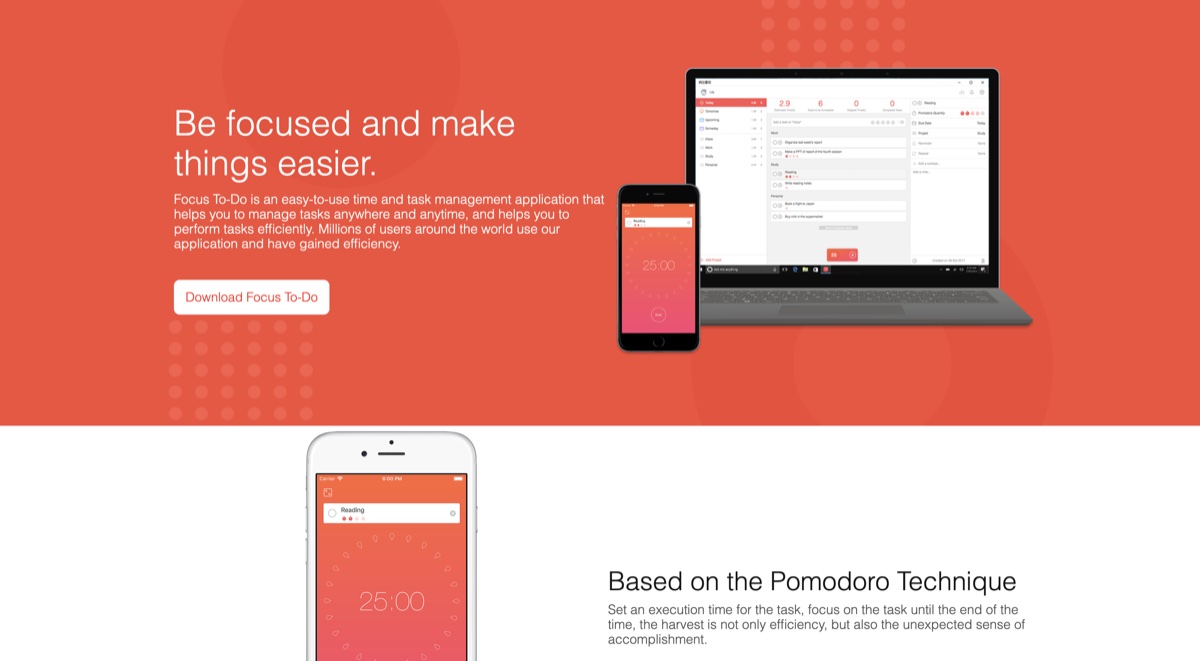
Focus To-Do: Pomodoro Timer Meets Task Manager
Focus To-Do combines the classic pomodoro technique — 25-minute focused work sessions separated by short breaks — with a full task management app. Users can build a to-do list, attach pomodoro estimates to each task, and track progress across days, weeks, and months. The app is cross-platform, with mobile and desktop versions that sync, making it a popular choice among students, remote workers, and anyone who has tried standalone pomodoro apps and wished they captured tasks too.
Features And Benefits
- Integrated Pomodoro and To-Do — Most pomodoro apps are timers only, and most to-do apps lack focus sessions. Focus To-Do bridges both in a single tool.
- Cross-Platform Sync — Available on iOS, Android, macOS, Windows, Apple Watch, and as a Chrome extension, with free cloud sync between devices.
- Detailed Reports — Daily, weekly, and monthly statistics show focus time, completed pomodoros, and task completion trends.
- Customisable Pomodoro Length — While 25-minute sessions are the default, users can adjust work and break durations to suit their own concentration patterns.
- White Noise and Focus Music — Built-in ambient sounds (rain, café, fireplace) help establish a focus environment without a separate app.
In-Depth Pros And Cons
Pros
- Genuinely free tier — The free version is fully functional for solo use, with the premium upgrade unlocking advanced reports and sync features at a one-time fee rather than a subscription.
- Cross-platform reliability — Sync works smoothly across iOS, Android, macOS, and Windows, which sets it apart from many app-store-only timers.
- Lightweight UI — The interface stays out of the way during focus sessions, with the timer prominently displayed but minimal chrome.
Cons
- Niche fit — Users who already have a separate task manager (Todoist, Things, TickTick) may find the duplicate workflow annoying.
- Limited collaboration — Designed for individual use; teams will need a different tool for shared task management.
- Premium upsell — Some advanced reports and themes require the premium tier, though the price is reasonable as a lifetime purchase.
Alternatives to Consider
- TickTick — To-do app with built-in pomodoro timer
- Brain.fm — Focus music designed to help maintain concentration during work sessions
- Toggl Track — Time tracking with optional pomodoro mode
Related Reading
- The Pomodoro Technique Explained
- Best Focus Apps for Remote Workers
Conclusion
Focus To-Do is the rare app that does pomodoro and task management equally well, in a single integrated workflow. For students, remote workers, and anyone whose existing pomodoro setup involves toggling between two or three apps, it is a tidy solution that works across every device they own. The lifetime premium pricing is a refreshing alternative to the subscription-driven productivity software market.